> ## Documentation Index
> Fetch the complete documentation index at: https://docs.daydream.live/llms.txt
> Use this file to discover all available pages before exploring further.
# FFMpeg Installation
> How to check if FFMpeg is installed and install it if needed
This guide is ONLY necessary for users of StreamDiffusionTD
**Check if ffmpeg is installed:**
```bash theme={null}
ffmpeg -version
```
**Installation:**
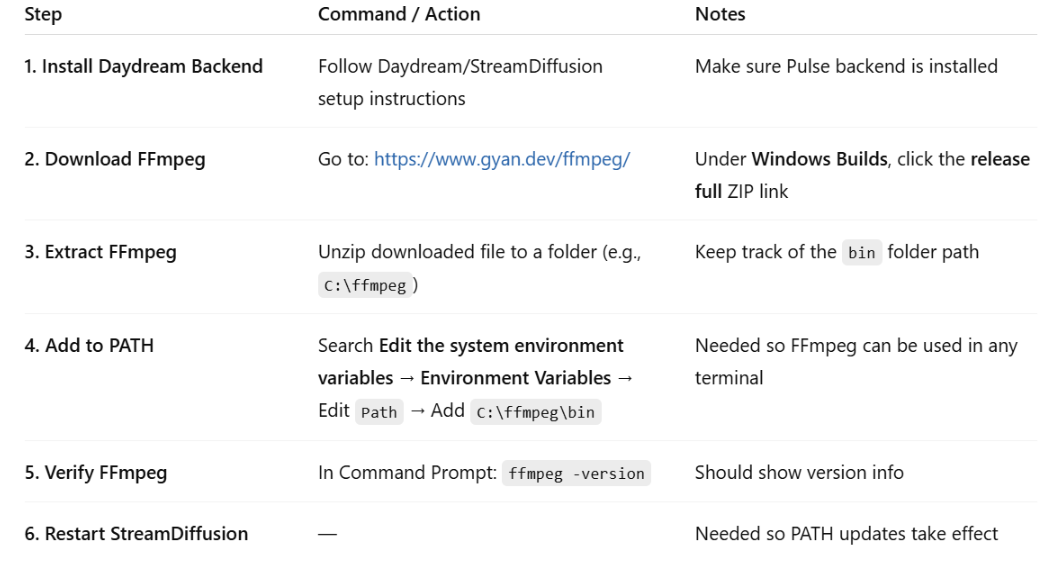
**Windows**
1. Visit the [ffmpeg download page](https://www.gyan.dev/ffmpeg/)
2. Download the latest release build
3. Extract to `C:\ffmpeg`
4. Add `C:\ffmpeg\bin` to your system PATH
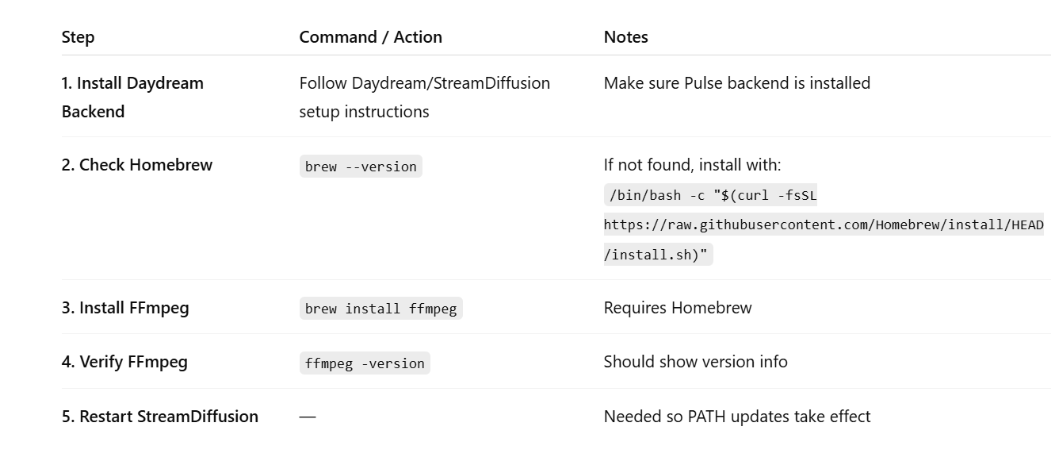
 **macOS**
```bash theme={null}
# Using Homebrew
brew install ffmpeg
# Using MacPorts
sudo port install ffmpeg
```
**macOS**
```bash theme={null}
# Using Homebrew
brew install ffmpeg
# Using MacPorts
sudo port install ffmpeg
```
 **Linux (Ubuntu/Debian)**
```bash theme={null}
sudo apt update
sudo apt install ffmpeg
```
**Linux (Ubuntu/Debian)**
```bash theme={null}
sudo apt update
sudo apt install ffmpeg
```