

IP-Adapters let you supply a reference image that the model uses as style, tone, or visual influence while still responding to your text prompt. They work alongside your prompts, ControlNets, and Step Schedules to give the AI a stronger sense of artistic direction.Documentation Index
Fetch the complete documentation index at: https://docs.daydream.live/llms.txt
Use this file to discover all available pages before exploring further.
How It Works
Instead of relying solely on text to describe both the style and the subject, you can split the work:- Text prompt → defines the overall aesthetic
- IP-Adapter image → provides the visual identity or style
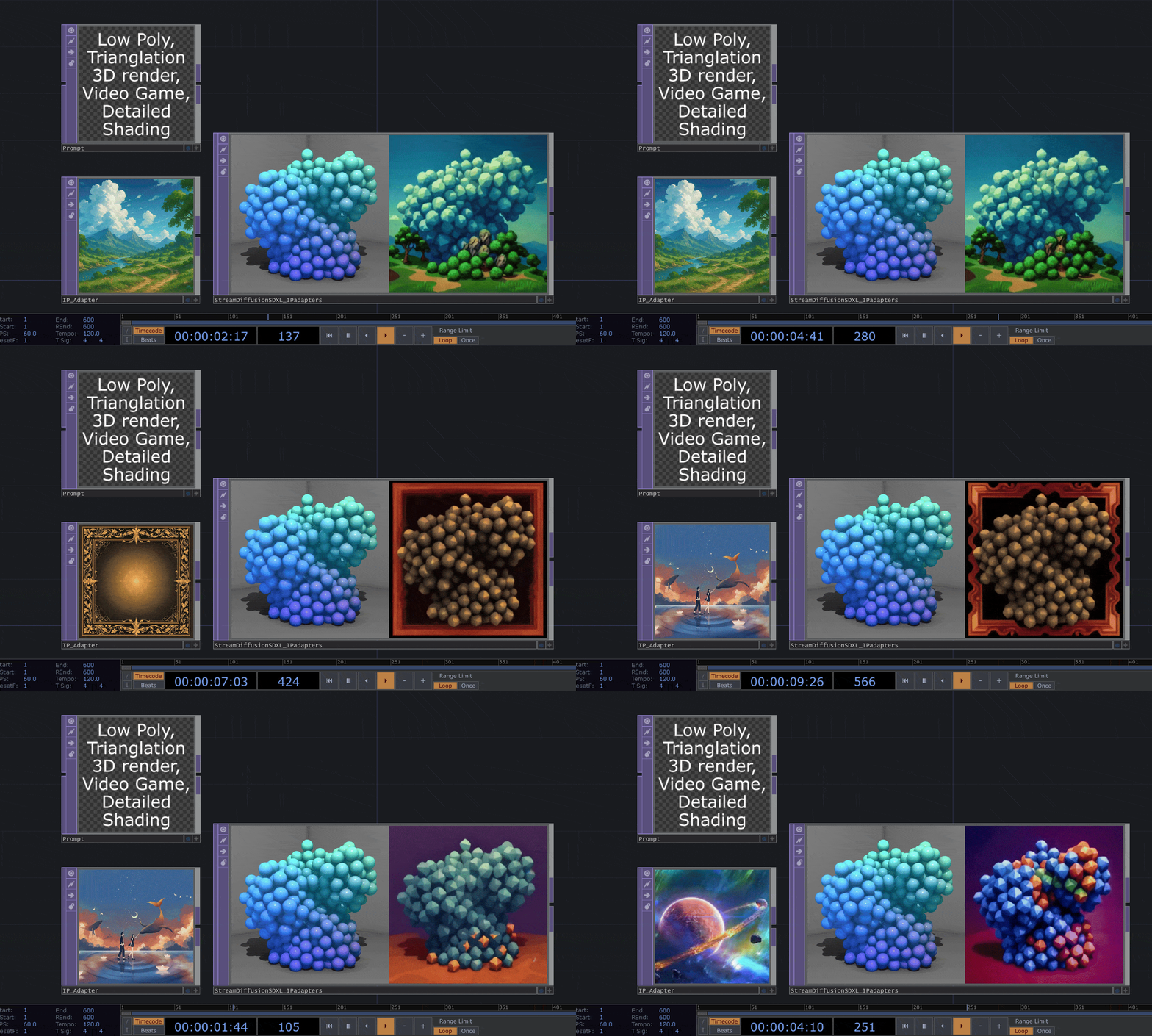
Example
- Text Prompt: “Low Polygon Render” (defines the base style)
- IP-Adapter Image: A photo of a mystical galaxy (defines color composition, line work, small details)
Usage
Set the IP Adapter in your stream parameters:Parameters
| Parameter | Description |
|---|---|
ip_adapter.enabled | Enable/disable IP Adapter |
ip_adapter.scale | How strongly the reference image influences output (0-1) |
ip_adapter_style_image_url | URL to your reference image |
IP-Adapters are available for SDXL and SD1.5 models.